
SAT Practice Test Timing: Time Limits and 7 Pacing Tips
A digital SAT practice test takes 2 hours 14 minutes plus a 10-minute break. Get module time limits, per-question pacing targets, and 7 timing tips.
Try a question now. No account needed.

SAT Practice Test Timing: Time Limits and 7 Pacing Tips
A full digital SAT practice test in Bluebook takes 2 hours 14 minutes of testing time plus a 10-minute break. Each Reading and Writing module is 32 minutes and each Math module is 35 minutes. To pace well, set per-question targets, check the clock at set points, and skip slow questions.
You can know the material and still lose points if the clock beats you. On the digital SAT, timing is part of the job: 32 minutes per Reading and Writing module and 35 minutes per Math module, with 2 hours 14 minutes total test time and a 10-minute break between sections.
Here’s the short version of what I’d want to know before my next practice test:
- Learn the exact module time limits before you start.
- Set a rough pace per question so you know if you’re drifting.
- Check the clock at set points, not after every question.
- Skip slow questions and return later instead of getting stuck.
- Practice under timed, test-like conditions so pacing feels normal.
- Review why time was lost after each practice module.
- Build stamina step by step so your pace holds through all four modules.
A few key numbers help right away:
| Module | Questions | Time | Rough pace |
|---|---|---|---|
| Reading and Writing | 27 | 32 minutes | about 1:11 each |
| Math | 22 | 35 minutes | about 1:35 each |
What stands out is simple: Reading and Writing is tighter, while Math gives you a bit more time per question. So if I keep falling behind, I shouldn’t just tell myself to move faster. I should check which question types are slowing me down and fix that part of my process.
The article’s main point is clear: timing gets better when I use the same pacing system every time I practice. That means a set pace, clock checks, smart skipping, and a short review after each timed module.
Quick FAQ
-
How long is the digital SAT?
2 hours 14 minutes, plus a 10-minute break between the two main sections. -
How is time split up?
Reading and Writing is 64 minutes total across 2 timed modules. Math is 70 minutes total across 2 timed modules. -
What should I do if one question eats up too much time?
Flag it, move on, and come back later if time is left. -
Where can I practice timing?
Use College Board's free Bluebook practice tests for full timed modules. SAT Practice Bot (free during beta, not affiliated with College Board) offers curated Math and Reading and Writing skill practice with explanations after grading and progress tracking. It doesn't offer full-length timed exams yet.
If I want better timing, I need to treat pacing like a skill I train, not something I hope fixes itself by test day.
Digital SAT Timing Structure at a Glance
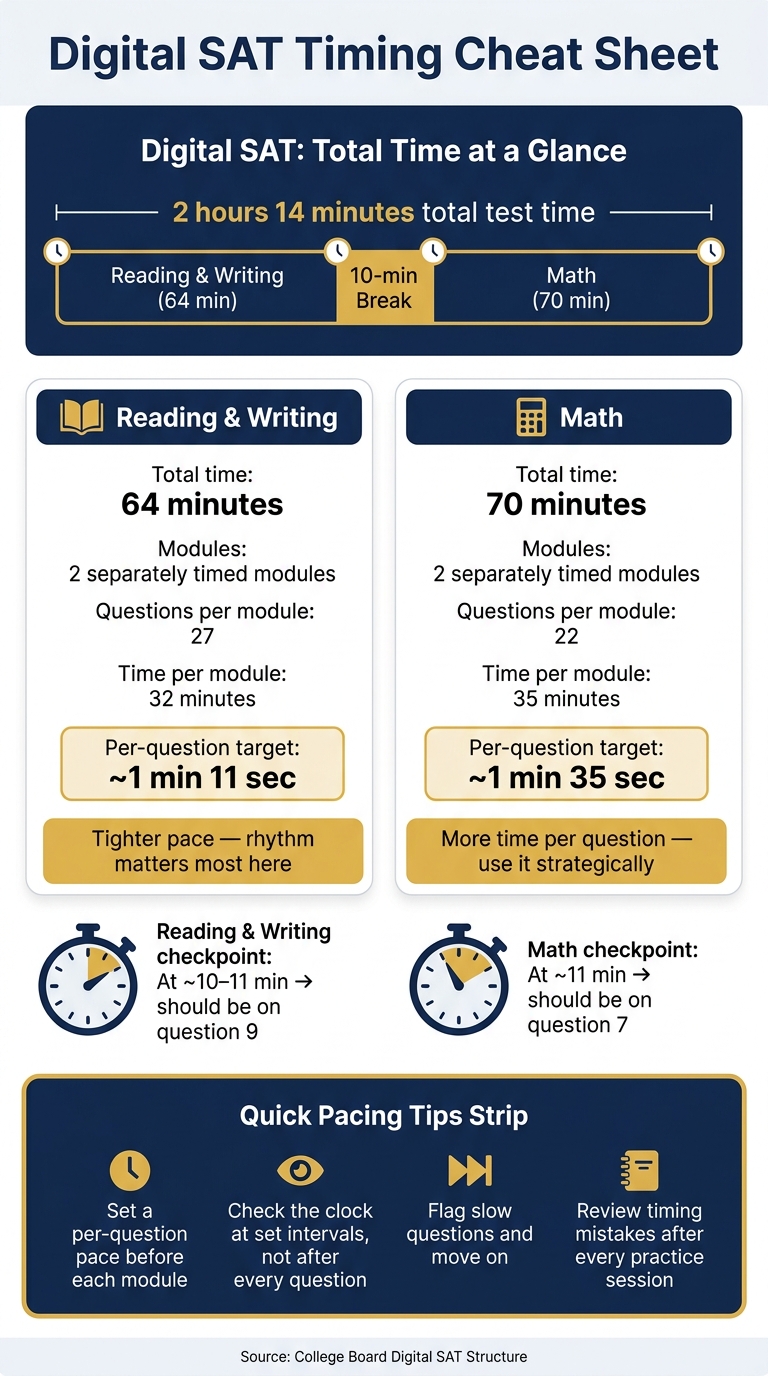
Digital SAT Timing Cheat Sheet: Module-by-Module Pacing Guide
The digital SAT has 2 hours 14 minutes of testing and a 10-minute break, for about 2 hours 24 minutes before setup. It has two main sections: Reading and Writing for 64 minutes and Math for 70 minutes. There’s also a 10-minute break between those sections. Per College Board, each section is split into two separately timed modules, so you need to manage your time inside each module, not just across the full section.
| Section | Total Time | Modules |
|---|---|---|
| Reading and Writing | 64 minutes | 2 separately timed modules |
| Math | 70 minutes | 2 separately timed modules |
| Break | 10 minutes | Between sections |
| Full Test | 2 hours 14 minutes of testing (about 2 hours 24 minutes with the break) | 4 modules |
Use these limits to set your pacing targets in the tips below.
How long does an SAT practice test take on Bluebook?
The same as the real test: two Reading and Writing modules (32 minutes each), a 10-minute break, then two Math modules (35 minutes each). Plan on about 2.5 hours including check-in.
Try practice by skill between full tests and Desmos speed practice for Math. Related post: SAT Time Management: How to Calculate Your Pace per Module.
1. Know the Official SAT Time Limits
Know the exact time limit for each digital SAT section and module before you start practicing. If you practice with no firm clock, pacing gets sloppy fast, and the same timing mistakes tend to show up again and again.
Before you begin, write the time limits on your scratch paper or next to your practice set. Keep them in view for every question. That small step makes it easier to pace yourself on purpose instead of guessing as you go.
2. Set Question Pacing Targets
Before a module starts, turn the full time limit into a per-question pace. The digital SAT gives each module a set amount of time and a set number of questions, so you can use that to get a simple target for how long each question should take. Then, as you work, check whether you're staying close to that pace.
Treat that number like a guide, not a hard rule. Some questions will be fast. Others will eat up more time. That’s normal. What matters is your overall pace, not spending the exact same amount of time on every question.
If one question is taking much longer than your target, move on and come back if time is left. That way, pacing helps you stay in control without boxing you in.
Pacing targets make it easier to catch timing trouble early and stay on track through the module.
3. Use Clock Checkpoints During Each Module
Pacing targets tell you where you should be. Checkpoints tell you whether you’re actually there.
Split each module into smaller time checks. At a natural stopping point, glance at the timer and ask: are you ahead, on pace, or behind? Then make a fast decision. Do you need to move faster, slow down a bit, or skip and come back later? That short check can help you spot pacing trouble early and make small fixes before it turns into a bigger problem.
If you fall behind, don’t get stuck. Flag the question that’s taking too long, move on, and reset your pace right away. If there’s time left at the end, come back to it.
4. Skip and Return to Slow Questions
When a time check shows you're behind, skip the slow question and keep going. Finish the easier questions first, then come back to the marked ones if you still have time.
After you move on, choose what to revisit based on how solvable it looks, not where it appears in the module. Start with the questions that seem easiest to finish. Save the least familiar ones for last, and only give them extra time if the clock allows it.
To rehearse skip-and-return, use Bluebook's Mark for Review tool on a full practice test. To fix the content that made a question slow, practice that skill on its own. SAT Practice Bot has free practice by skill.
5. Practice Full Timed Sections Under Real Conditions
Now put those timing skills into a full run. Skipping hard questions and checking the clock only start to feel automatic when you practice under test-like conditions: a quiet space, the official module time limits, and one full section from start to finish. Use the same pacing and skip-then-return habits you worked on earlier.
Full modules build stamina in a way short drills just don't. They train you to hold a steady pace all the way to the last question.
Each timed session also shows you where your pacing starts to slip, so you can fix it before test day.
After each session, write down what slowed you down:
- a certain question type
- the second half of the module
- or both
Use those notes to make your next timing review faster and more exact.
6. Review Timing Mistakes After Each Practice Test
When the timer ends, the most useful part starts: the review. After each timed module, go back to every question that took too long.
Treat each timed module like a set of timing notes. Mark each slow question, then tag the reason:
- Content gap: you didn’t know the rule, fact, or skill well enough
- Rereading: you had to go back because the question or passage didn’t stick the first time
- Taking too long to decide: you were stuck between choices
- Overchecking: you solved it, but then spent extra time checking again
That label matters. A content gap calls for skill review. A process issue calls for a pacing change.
Use SAT Practice Bot's explanations and performance data to sort content gaps from timing habits.
Then make one pacing change for your next timed module. Maybe you move on faster from hard questions. Maybe you stop rereading full passages. Pick one rule, test it in the next module, and see what changes.
7. Build Module Stamina Before Test Day
Once your pacing feels steady, work on keeping your focus through the full Digital SAT. Good timing only helps if you can stay sharp across all four modules.
Build stamina little by little. Start with one timed module about 2–4 weeks before test day. First, make sure you can hit your pacing target in that one module. Then add another only when your work stays accurate and even.
After each session, write down where your focus started to slip. Use that note to adjust the length of your next session. Strong, accurate work in one module is better than rushing through four. When your accuracy stays steady in shorter sessions, stretch the session a bit longer.
Quick Pacing Reference
Use these numbers as simple checkpoints while you work. The target time changes by module.
| SAT Module | Questions | Total Time | Per-Question Target |
|---|---|---|---|
| Reading and Writing | 27 | 32 minutes | ~1 min 11 sec |
| Math | 22 | 35 minutes | ~1 min 35 sec |
Math gives you more time per question. Reading and Writing is tighter, so pace matters more there. You need a fast, steady read-and-answer rhythm.
These targets also help you set clock checkpoints during each module and stick with the skip-and-return habit from Tip 4. In Reading and Writing, you should be at about question 9 around the 10- to 11-minute mark. In Math, reaching question 7 at about 11 minutes means you're still on pace.
If you keep missing those marks, don't just tell yourself to "go faster." Look at the question types slowing you down and fix that part of your approach.
Tools for Timed SAT Practice
After you set pacing targets and checkpoints, keep practicing until the moves feel natural.
- Bluebook (College Board): free full-length, adaptive practice tests with the real timer, Mark for Review, and built-in Desmos. Use these for full-module timing.
- SAT Practice Bot: a web practice site for the digital SAT, free during its private beta. It offers curated Math and Reading and Writing practice by domain and category, explanations after grading, step-by-step help, and progress tracking. Use it to fix the question types that slow you down. Full-length timed exams aren't open yet.
Start with a skill page: Algebra · Advanced Math · Problem-Solving and Data Analysis · Geometry and Trigonometry · Information and Ideas · Craft and Structure · Expression of Ideas · Standard English Conventions
For the pacing math in one place, see SAT Time Management: How to Calculate Your Pace.
SAT Practice Bot is not affiliated with College Board.
Conclusion
Good SAT timing comes from a repeatable system. Learn the official time limits, set clear pacing targets, and use clock checkpoints in each module. If a question starts eating up time, move on and come back if you can.
Practice under full timed conditions, not just in short drills. After each session, check where your time went. Did one hard math question pull you off pace? Did you spend too long rereading a passage? That review matters because it shows you why time slipped away.
Use the same approach on every practice test so pacing starts to feel steady instead of rushed.